AdamBots Team 245
Before we start

Sign in

  1. 1Open your phone's camera
  2. 2Point it at the code
  3. 3Tap the link and fill in the form

No phone? Tell a mentor and we'll sign you in.

Today Session 1 · How Computers Think Rookie Bootcamp · Programming Track
📋 Attendance
forms.gle/os9g31bhyXHY3bPd6
AdamBots Team 245
Rookie Bootcamp · Programming Track · Session 1

How
Computers
Think

From a switch to a robot

Warm-up

Where are the computers in this room?

📱Your phone
💻Laptops
🧮Calculators
🔑Car key fobs
📺The TV
⌚Smart watches
🤖
The robot's controller
By the end of bootcamp, you'll program this one.
Today's plan

We'll climb from a single switch to a robot

Each section adds one rung. By the end, you'll know what really happens when you press Deploy.

01

What's inside a computer

★ Story time
1945How big was a computer?

From a room
to your pocket

1940s"Computers" were people doing math by hand. NASA's Katherine Johnson checked the math for John Glenn's 1962 orbit.
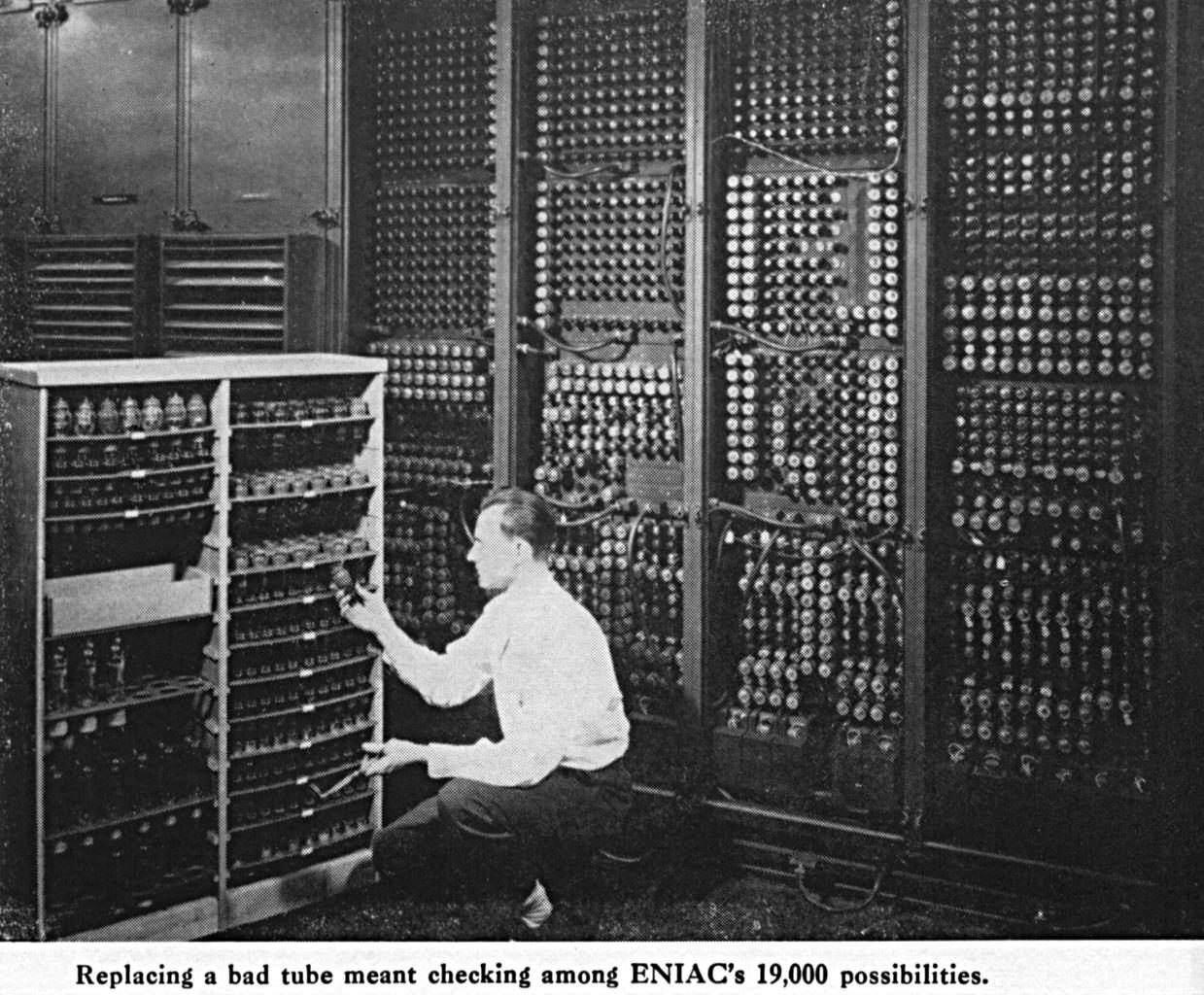
1945ENIAC, one of the first electronic computers, weighed about 30 tons and filled a room.
1969The Apollo computer flew astronauts to the Moon with about 4 KB of working memory.
TodayYour phone has millions of times more memory than Apollo.
ENIAC · room-sized · 30 tons
Apollo
← your phone
(click ENIAC or Apollo to see the real one)
Same ideas inside. Just smaller, faster and cheaper every year.
The big picture

Every computer does three things

Input

Keyboard, mouse, touchscreen
Robot: joysticks, sensors

Process

The CPU follows instructions and makes decisions

Output

Screen, speakers
Robot: motors, lights

…and it Remembersstorage keeps programs and data for later
Inside the box

Four parts work together like a kitchen

👩‍🍳The chef

CPU

Does the work, one step at a time, billions of steps per second.

🍽️The counter

Memory (RAM)

Holds what you're working on right now. Fast, but small.

🥫The pantry

Storage

Keeps everything, even when the power is off.

🚪The doors

Input / Output

Orders come in, finished dishes go out.

★ And the recipe?That's the program: the step-by-step instructions the chef follows.
Compare

Memory forgets. Storage remembers.

The counter

RAM

  • Super fast
  • Smaller (8 to 16 GB in a laptop)
  • Erased when the power goes off
VS
The pantry

Storage

  • Slower
  • Bigger (hundreds of GB)
  • Keeps everything with the power off
◆ On the robotEvery time you turn the robot on, RAM starts empty and the code loads from storage. That's the "boot up" you'll wait through at every match.
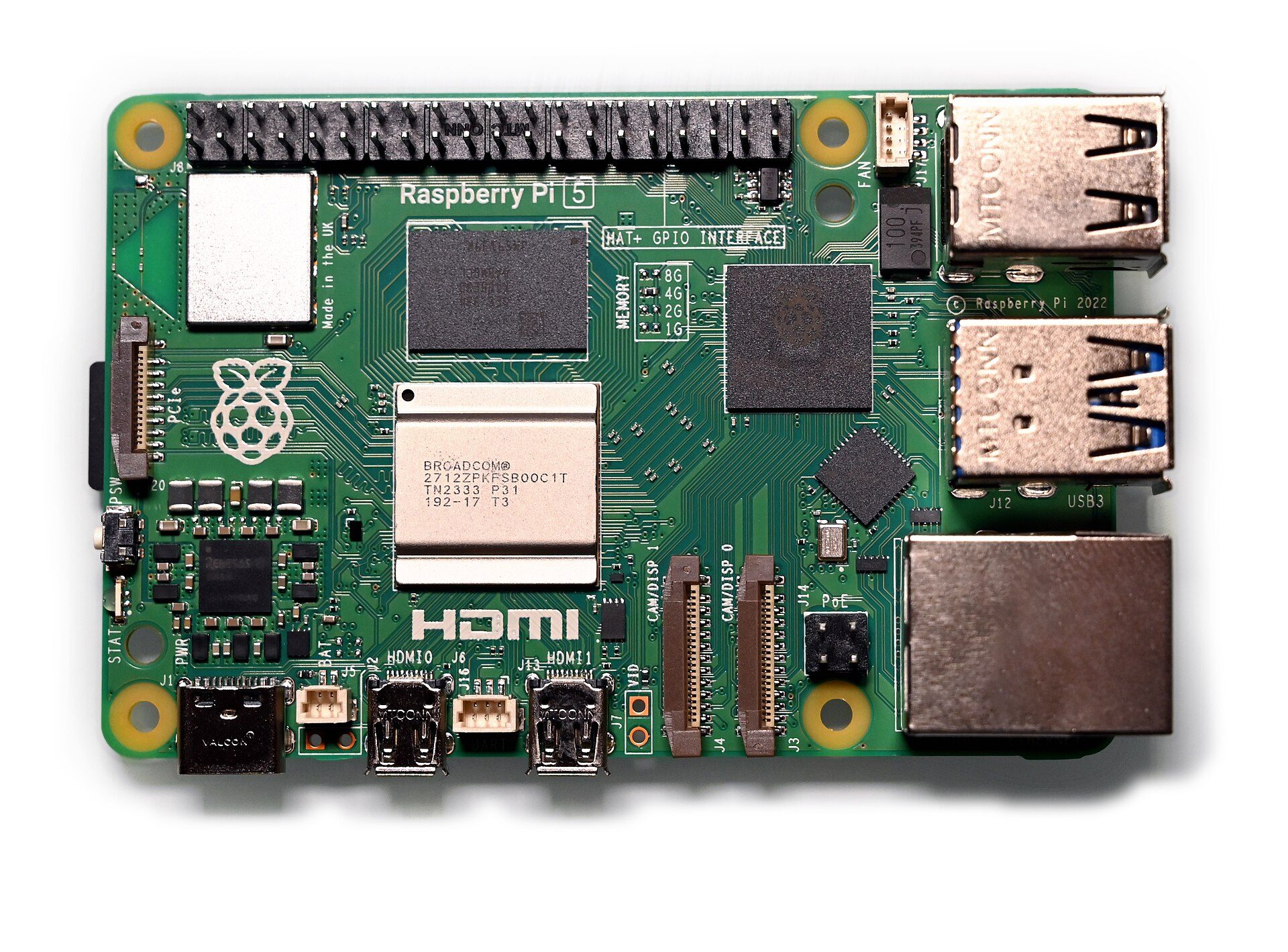
Top view of a Raspberry Pi 5 computer board
1Processor
2RAM
3microSD slot
4Power (USB-C)
5Wi-Fi radio
6GPIO pins
7USB ports
Photo: Simon Waldherr, CC BY 4.0, via Wikimedia Commons
▶ Try it · 3 min

A Raspberry Pi 5: a whole computer on one small board. Name the parts!

1Processor (CPU) · the chef, 4 cores
2RAM · the counter
3Storage (microSD) · the pantry
4Power (USB-C) · 5 volts in
5Wireless · Wi-Fi and Bluetooth
6GPIO pins · wire up sensors, lights
7USB & network · input/output
★ Our new robot brainThe new FRC controller, SystemCore, is built on a Raspberry Pi Compute Module 5: this same processor and RAM on a small plug-in card.
02

How we count (and how computers count)

★ Story time
10fingers. That's it.

Why do we count in tens?

Ask"Why ten?" Hold up your hands. You run out of fingers at 10, so you start a new column.
IndiaOur digits 0 to 9 come from India, along with a huge idea: place value and zero. The same "2" can mean two, twenty or two hundred.
~1200Arab scholars spread the system, and it reached Europe around 1200 (thanks to Fibonacci).
2
Hundreds
200
4
Tens
40
5
Ones
5
= 245 our team number!
★ Story time
4,000years ago in Mesopotamia

The Babylonians counted in sixties

WhoThe Sumerians, and later the Babylonians (modern-day Iraq), used base 60.
Why 60?It splits evenly a lot of ways. Great for sharing grain and trading.
÷2 = 30÷3 = 20÷4 = 15÷5 = 12÷6 = 10÷10 = 6÷12 = 5
60seconds
60minutes
360°in a circle
When the robot's gyro says "turn 90°," that's Babylonian math running on a computer.
▶ Try it · 1 min

Count to 60 on your hands, Babylonian style

Your thumb taps the 12 finger segments on one hand. Each time you reach 12, raise one finger on the other hand. 12 × 5 = 60. (A popular theory for why they picked 60.)

10
11
12
7
8
9
4
5
6
1
2
3
thumb
taps
Right hand: 12 segments
12
24
36
48
60
Left hand: dozens
0
0 × 12 + 0
Quick world tour Optional

Number systems are a human choice

🦶

The Maya: base 20

Fingers and toes. Twenty was their "ten."

🇫🇷

French: 80 = "four twenties"

In French, 80 is quatre-vingts, a leftover from counting in twenties.

🥚

Dozens: base 12

12 eggs, 12 months, 12 hours on a clock face, 12 inches in a foot.

◆ The questionSo what would you count in if you only had two fingers?
★ Story time

Meet the Zibbits
from planet Duo. One finger per hand.

Zibbit writesIt means
0zero
1one (out of fingers!)
10two (start a new column)
11three
100four
10A Zibbit birthday cake that says 10 is for a two-year-old.
★ Quick questionA Zibbit says it's 1111 years old. How old is it? → 15!
Plot twist

Computers
are Zibbits

OFF = 0
ON = 1

A switch has only two states, so computers count in base 2: binary.

"There are 10 kinds of people: those who understand binary and those who don't."

Place values

In binary, each place is worth double the last

Decimal: each place is ×10
1000
×10
100
×10
10
×10
1
Binary: each place is ×2
128
64
32
16
8
4
2
1

Same idea as decimal. Only two digits: 0 and 1.

Watch it count

Four switches can count from 0 to 15

Click any bulb to flip it. Notice the rightmost bulb flips every time, like an odometer.

▶ Try it · 2 min

Count in binary on one hand

Each finger is a bit

  • Show 5
  • Show 10
  • Show 21
  • Show 31 (all up!)

One hand counts to 31. Two hands reach 1,023.

Binary → decimal

Add up the places that are on

8
4
2
1
1
0
1
1
8
0
2
1
8 + 0 + 2 + 1
= 11

So the Zibbit who was 1111 years old? 8 + 4 + 2 + 1 = 15.

Decimal → binary

Our team number in binary

Take the biggest place that fits, subtract, repeat.

Start: 245
245 − 128 = 117
117 − 64 = 53
53 − 32 = 21
21 − 16 = 5
8 doesn't fit → 0
5 − 4 = 1
2 doesn't fit → 0
1 − 1 = 0 ✓
245 = 11110101. Our team number fits exactly in 8 switches.
Binary math

Binary addition has just four rules

0+0 = 0
0+1 = 1
1+1 = 10write 0, carry 1 (like 9 + 1)
1+1+1 = 11write 1, carry 1
1
1
1
0
1
0
1
5
+
0
0
1
1
3
1
0
0
0
8 ✓

Right to left, carry when you hit 10. Same as decimal, just sooner.

▶ Try it · 5 min

Your turn: pen and paper first, then check

Binary → decimal

  1. 101 = 5
  2. 1111 = 15
  3. 10010 = 18
  4. 11110101 = 245

Decimal → binary

  1. 7 = 111
  2. 12 = 1100
  3. 20 = 10100
  4. Your age

Add

  1. 0011 + 0001 = 0100
  2. 0101 + 0011 = 1000
  3. 0110 + 0111 = 1101
  4. 1111 + 0001 = 10000 ⚠
Check on your laptop:  Windows: Calculator → menu → Programmer (BIN / DEC)  ·  Mac: Calculator → View → Programmer (⌘3)  ·  Chromebook: search Google for "1011 binary to decimal"
Bits and bytes

8 bits make a byte

1 bit

One switch: 0 or 1

1 byte = 8 bits

256 combinations: 0 to 255. Enough for one letter or one number up to 255.

KB
thousand bytes · a text message
MB
million bytes · a song or a photo
GB
billion bytes · a movie, a phone's RAM
TB
trillion bytes · a big hard drive
★ Story time
1980An arcade classic

The level that broke the game

In Pac-Man, the level number was stored in one byte. A byte maxes out at 255.

LEVEL
253
2014"Gangnam Style" passed 2,147,483,647 YouTube views, the biggest number the counter could hold. YouTube had to upgrade it.
Computers only have as many bits as we give them.
03

Switches that make decisions

★ Story time
1854
→ 1937An idea waiting 80 years

The logic teacher and the student

GB
1854

George Boole

A mostly self-taught English math teacher invents a math of just TRUE and FALSE. No computers exist. People think it's a curiosity.

CS
1937

Claude Shannon

A 21-year-old student at MIT realizes electrical switches can do Boole's logic. His master's thesis becomes the blueprint for digital computers.

Michigan kid!
Pure MichiganShannon was born in Petoskey, grew up in Gaylord, and graduated from the University of Michigan in 1936. The father of the digital age grew up a few hours north of here.
An idea nobody needed for 80 years now runs every computer on Earth, including our robot.
The switch inside every computer

A switch flipped by electricity: tubes, then transistors

1906

Vacuum tube

LIGHT + − plate grid filament control
Grid: blocking → light OFF
Replacing a tube in ENIACGlass, hot, thumb-sized, burned out often. ENIAC needed about 18,000.
1947

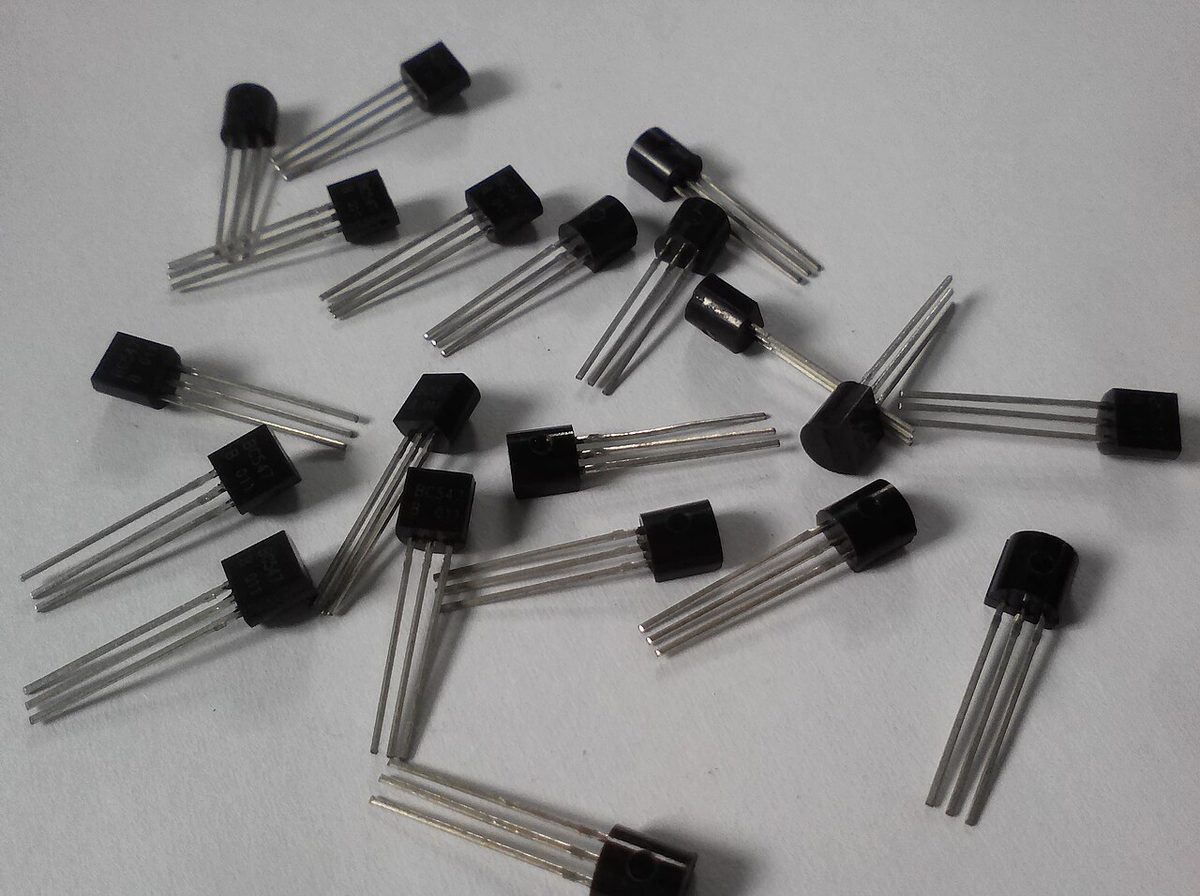
Transistor

LIGHT + − CEB control
Base: no signal → light OFF
Small transistorsNo glass, no heat-up, no moving parts. A modern chip has billions.
A tiny signal turns a big current on or off. Wire a few together and you get a logic gate.
Logic gates · click the switches

Three basic gates make every decision a computer can make

NOT
Flips it. ON becomes OFF.
AND
ON only if both inputs are ON.
OR
ON if at least one input is ON.
More gates · click the switches

Add a NOT and you get even more gates

NAND
"NOT AND." The opposite of AND: OFF only if both are ON.
NOR
"NOT OR." The opposite of OR: ON only if both are OFF.
XOR
"Exclusive OR." ON if exactly one is ON. Watch for it in two slides.
★ See the little circle?That bubble on the output means NOT: it flips the answer.
◆ SuperpowerNAND and NOR are universal: you can build every other gate out of just one of them. The Apollo computer that flew to the Moon was built almost entirely from NOR gates.
Gates on our robot

The robot makes these decisions 50 times a second

Drive only if the robot is enabled AND the trigger is held
AND
enabled && trigger
Stop the arm if the limit switch OR the e-stop is pressed
OR
limitSwitch || eStop
Run the intake only if it's NOT already full
NOT
!intakeFull

Sneak peek: that right column is real Java. You'll write it next time.

Gates can do math

Two gates can add two bits

XOR AND
0
Sum
0
Carry
  • XOR ("exclusive or"): ON when exactly one input is ON → the sum bit
  • AND: ON when both are ON → the carry bit

Turn both on: 1 + 1 = 10. This circuit does exactly what you just did on paper.

Transistors billions of tiny switches
Logic gates NOT, AND, OR, XOR
Adders & memory do math, remember bits
CPU runs your programs
Stacking up

A CPU is a very well-organized pile of switches

Nothing magic. Just switches, built into gates, built into bigger and bigger pieces.

▶ Try it · 4 min

Be a half adder: 4 people add two bits

🙋Ainput
🙋Binput
→
🧑‍🔧ANDthe Carry
🧑‍🔧XORthe Sum

The rules

  • A, B: hand up = 1, hand down = 0. Mentor tells you which.
  • XOR: hand up if exactly one of A, B has a hand up.
  • AND: hand up only if both have a hand up.
  • Read the answer: AND then XOR, left to right.
RoundABAND
carry
XOR
sum
Answer
1000000 = 0
2100101 = 1
3010101 = 1
4111010 = 2 ✓
04

Everything is numbers

★ Story time
1844The telegraph

Messages made of two symbols

1844Samuel Morse's telegraph sends messages across the country using only short and long beeps.
S = • • •O = ▬ ▬ ▬E = •T = ▬A = • ▬
Agree on a code, and just two symbols can say anything.
Text

Every letter is secretly a number

A
=
65
=
01000001
★ This code has a nameASCII(say "ASK-ee") American Standard Code for Information InterchangeOne shared table gives every English letter, digit and symbol a number from 0 to 127. Every computer uses the same table, so the "A" you send is the "A" I get.
B66
C67
Z90
a97
!33
😀128,512

When you type a message, your phone is really sending numbers. Emoji don't fit in ASCII's 128 spots, so they come from Unicode, a much bigger table that starts with ASCII.

Pictures

Zoom in far enough and a picture is just numbers

A picture is a grid of tiny squares called pixels.

Each pixel is three numbers: how much red, green and blue (0 to 255).

R 255G 216B 0

= AdamBots Gold. Hover over the picture to read any pixel.

Hover over a pixel
Sound and sensors

Sound and sensor readings are numbers too

Sound is measured thousands of times a second. Each dot is one number.

On our robot

Joystick position-0.73 Drive encoder4,096 ticks Gyro heading87.5° Limit switchtrue

A limit switch is a single bit: pressed or not.

Analog vs. digital · drag the sliders

The real world is smooth. Computers count in steps.

Analog (smooth)Digital (steps)

Analog

Smooth, any value in between. Like a ramp, a dimmer knob, or the hands on a clock.

Digital

Exact steps, stored as numbers. Like stairs, a light switch, or a digital clock. Copies perfectly, ignores noise.

◆ On the robotAnalog sensors (like a potentiometer on an arm) send a voltage. The controller's ADC (analog-to-digital converter) turns it into a number your code can use.
▶ Try it · 4 min

Decode the secret message (real ASCII!)

01000111 01001111
01000010 01001111 01010100 01010011

Each group of 8 bits is one character. Convert to decimal with 128-64-32-16-8-4-2-1, then look it up. Each row is one word.

A65
B66
C67
D68
E69
F70
G71
H72
I73
J74
K75
L76
M77
N78
O79
P80
Q81
R82
S83
T84
U85
V86
W87
X88
Y89
Z90
★ ShortcutEvery capital letter starts with 010 (that's 64). The last 5 bits are its place in the alphabet: 010 00111 → 7 → G.
GO BOTS
05

Programs: recipes for computers

★ Story time
1804
1843Holes, looms and a visionary

The loom and the first programmer

1804Joseph Marie Jacquard builds a weaving loom controlled by cards with punched holes. Change the cards, change the pattern. A program made of holes!
→
1843Ada Lovelace writes step-by-step instructions for Charles Babbage's Analytical Engine. It was never built, but she's often called the first computer programmer. She even guessed machines might one day make music.
A program is just instructions, stored so a machine can follow them.
What is a program?

Computers do exactly what you say, not what you mean

You say"Put peanut butter on the bread."
Computer doesPlaces the whole closed jar on top of the bag of bread. ✓ Done!

What it actually needed

1. Open the bread bag. 2. Take out one slice. 3. Unscrew the jar lid. 4. Pick up the knife. 5. Scoop peanut butter…

▶ Try it · 5 min

Write an autonomous routine: grab the ball, score it

Robot (arrow = facing)Game pieceGoalObstacle
Your program0 steps
Click commands to add steps. Made a mistake? Press ↶ Undo, or click × on any step to remove it.
Robot starts bottom-left, facing right.
Control structures · making decisions

if / else lets a program make decisions

check Is the path clear? YES forward() NO turnLeft()
The same idea in codeif / else
if (pathClear()) {
    forward();
} else {
    turnLeft();
}
Path clear? YES(click the switch)
★ Every dayIf it's raining, grab an umbrella. Else, grab sunglasses.
◆ Remember the gates?Conditions use AND, OR, NOT: if (enabled && triggerHeld)
Control structures · loops

Loops repeat code so you don't have to

forward() ran0times

Counted loop · "3 times"

repeat (3) {    forward();}
Press Run and watch the loop check before every round.

Condition loop · "until blocked"

while (pathClear()) {    forward();}
Press Run and watch the condition get checked before every move.
★ You've seen one alreadyThe robot's 20 ms loop is a loop that runs for the whole match.
⚠ Infinite loopIf the condition never becomes false, the loop never ends and the program freezes.
▶ Try it · Level 2 · 6 min

Level 2: the ball moves! Use if and loops to win

RobotBallPossible ball spot (random each run)Goal

        
Build your program. The ▌ shows where the next line goes.
How a program runs

The CPU repeats three steps, billions of times a second

Program in memory

0LOAD 5
1ADD 3
2STORE total
3JUMP 0
Fetch
→
Decode
→
Execute

Register A

0

Memory: total

?

Clock ticks

0

SystemCore's processor ticks about 2,400,000,000 times a second (2.4 GHz). This demo does about one.

Our robot

The robot runs a loop every 20 milliseconds

  • Read inputs: joysticks, sensors
  • Decide: your code runs
  • Set outputs: motors, lights
50×every second, for the whole match

This is WPILib's standard robot loop. It ran at 20 ms on the roboRIO and still does on SystemCore. Teams can change it.

Loops shown since this slide opened (slowed way down): 0

Types of programs

Not all programs are apps

🖥️

Operating systems

Run the whole computer and let other programs share it.

Windows, macOS, iOS, Android, Linux
🎮

Applications

What you open and use.

Games, browsers, Spotify
🔌

Embedded

Hidden inside devices, doing one job.

Microwaves, cars, motor controllers
☁️

Web & cloud

Run on servers far away.

YouTube, Google Docs
★ Where does our robot code fit?It's an application running on our robot controller, SystemCore, which runs Linux. The motor controllers have their own embedded programs too.
What happens when you press the power button?

From power on to your program, in five steps

Your programsbrowser, game, robot code
Shelldesktop or command line: how you talk to the OS
Kernelcore of the operating system
Boot loaderloads the OS
Firmware: BIOS / UEFItiny program in a chip on the board
HardwareCPU, RAM, storage, ports
1
Power on: firmware wakes upThe BIOS (or newer UEFI) is stored in a chip, so it runs even with nothing loaded. It checks the hardware (a "power-on self test") and finds the storage drive.
2
Boot loader starts the OSA small program on the drive copies the operating system's kernel from storage into RAM and starts it.
3
Kernel takes chargeThe kernel runs the whole time. It shares the CPU between programs, hands out memory, and talks to devices through drivers.
4
Shell: you can talk to itThe desktop (or a command-line terminal) appears. It's how you ask the OS to do things, like "open this program."
5
A program loads and runsThe OS copies the program from storage (pantry) into RAM (counter), and the CPU starts fetch, decode, execute. Each running program is called a process.
★ On our robotSystemCore boots the same way: firmware, boot loader, then the Linux kernel. Then it starts a program called the JVM, which loads and runs your robot code. More on that next session.
06

Speaking the computer's language

★ Story time
1952"Amazing Grace"

Grace Hopper and the nanosecond

1950sProgrammers wrote raw numbers. Navy mathematician Grace Hopper wanted to program in words.
"I had a running compiler and nobody would touch it. They told me computers could only do arithmetic."
1952She built one of the first compilers anyway, and later helped create COBOL, a language that still runs many banks today.
PropShe handed out wires 11.8 inches long: how far light travels in one nanosecond (a billionth of a second). "Don't waste nanoseconds!"
↑ 11.8 inches (roughly actual size on a big screen)
Same idea, three languages

Three ways to say "add 5 and 3"

Machine codeWhat the CPU actually reads
10110000 00000101
00000100 00000011
AssemblyA little more human
MOV AL, 5
ADD AL, 3
JavaWhat you'll write
int total = 5 + 3;
High-level languages

We write code for humans, then translate it

👀

Readable

Teammates can understand and fix your code.

🔁

Portable

The same code works on many kinds of computers.

🛡️

Safer

The language catches many mistakes for you.

FRC teams use:
JavaC++Python
Team 245 uses Java!
The translator

A compiler translates your code into machine code

Your codeint total = 5 + 3;
Compilerchecks it, then translates
Machine code10110000 …

Compiled

Like translating a whole book before anyone reads it. Fast to run. (Java, C++)

Interpreted

Like a live interpreter translating while you speak. Easy to try things. (Python)

★ Story time
1995Sun Microsystems

Java's first name was Oak

Early 90sJames Gosling's team builds a language for TV set-top boxes. He names it Oak, after a tree outside his office.
🌳→☕
1995"Oak" was already taken, so they renamed it after Java coffee. That's why the logo is a coffee cup.
Java's big promise: "Write once, run anywhere."
How our code gets to the robot

From your laptop to a moving robot

WriteJava in VS Code
(WPILib)
→
BuildCompiler turns Java
into bytecode
→
DeploySends it to the robot
over its network
→
RunThe Java Virtual Machine
on the robot runs it
Bytecode (simplified)for total = a + b
iload_1      // get a
iload_2      // get b
iadd         // add them
istore_3     // save total
◆ Why bytecode?Bytecode is a "universal" machine code. Any computer with a Java Virtual Machine (JVM) can run it. That's "write once, run anywhere."
Compare

Two kinds of mistakes

The compiler catches it

Syntax error

Like a spelling or grammar mistake.

motor.set(0.5) error: ';' expected
VS
Nobody catches it

Logic error

The code runs, but does the wrong thing.

motor.set(-0.5); // oops → robot drives backward
★ Story time
1947
1999Two famous bugs

A moth and a lost Mars probe

1947Operators of the Harvard Mark II computer found a real moth stuck in a relay and taped it into their logbook. (Engineers already said "bug," which is why it was funny.)
"First actual case of bug being found."
1999NASA's Mars Climate Orbiter was lost. One team's software used pounds, another expected metric newtons. The code ran perfectly: a logic error no compiler could catch.
On our robot: inches vs. meters, degrees vs. radians. Broke it? Great. Now we debug.
Recap

Three things to remember

01

Computers are billions of switches.

02

Binary and gates turn switches into numbers and decisions.

03

Compilers turn our words into those switches.

Quick check · tap an answer

How much do you remember?

1 · What is 1010 in decimal?

8 + 0 + 2 + 0 = 10

2 · Why are there 60 minutes in an hour?

Base 60 from ancient Mesopotamia

3 · Which gate lights only when both inputs are ON?

AND: both must be ON

4 · What does a compiler do?

Your Java → code the machine can run
AdamBots Team 245
Up next · Session 2

Intro to
Java

Next time, you write your first program.

Homework · before next session

Install WPILib on your laptop

It comes with its own VS Code, set up for robot code. Don't download VS Code on its own.

1Download
WPILib 2027 Alpha 7 github.com/wpilibsuite/allwpilib/releases/tag/v2027.0.0-alpha-7 Scroll to Assets and pick your file:
  • Windows 11…Windows-x64…iso
  • Mac, Apple chip (M1, M2…)…macOS-Arm64…dmg
  • Mac, Intel chip…macOS-Intel…dmg

Which Mac? Apple menu → About This Mac → Chip.

★ Big downloadAbout 2.5 GB. Download it at home on Wi-Fi.
⚠ Check your laptopNeeds Windows 11 or macOS 15 or newer. Chromebook or older laptop? Tell a mentor.

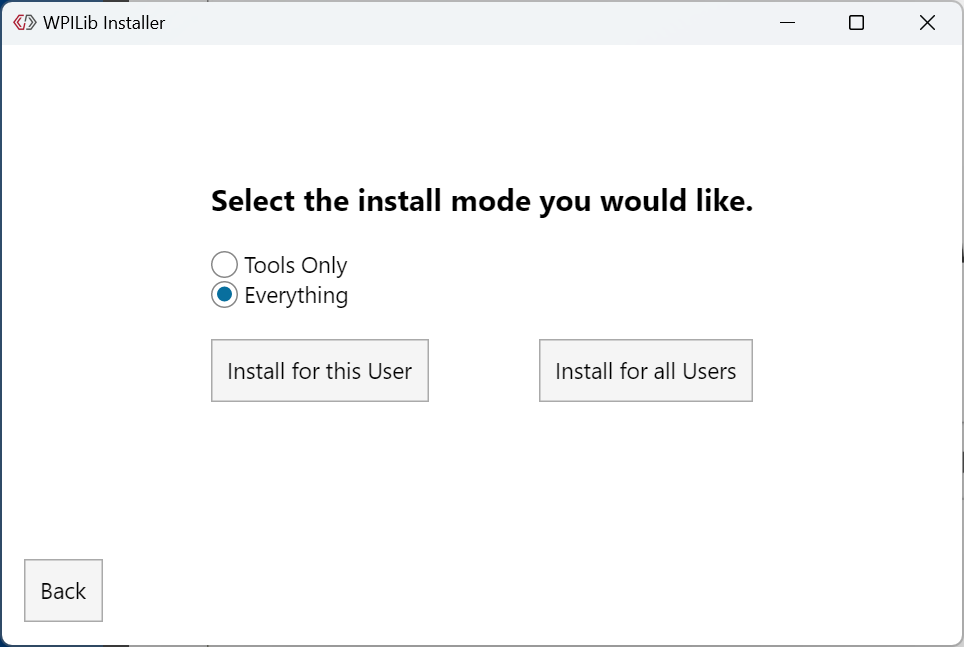
Installer screens: WPILib docs (docs.wpilib.org), CC BY 4.0. They show an earlier version; yours will say 2027. Click one to zoom.

2Install: take the defaults

Windows: right-click the .iso → Mount → open WPILibInstaller.exe. Mac: open the .dmg → WPILibInstaller.

WPILib installer: Press Start.1
Press Start
WPILib installer: Leave Everything selected, then press Install for this User.2
Keep Everything, then Install for this User
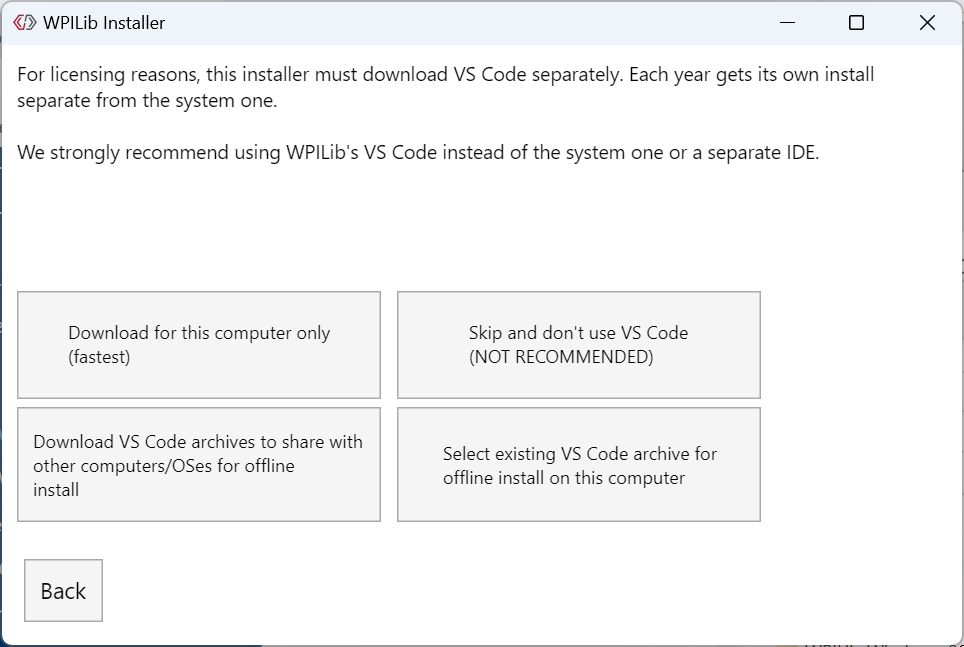
WPILib installer: Press Download for this computer only, then Next when the download finishes.3
Download for this computer only
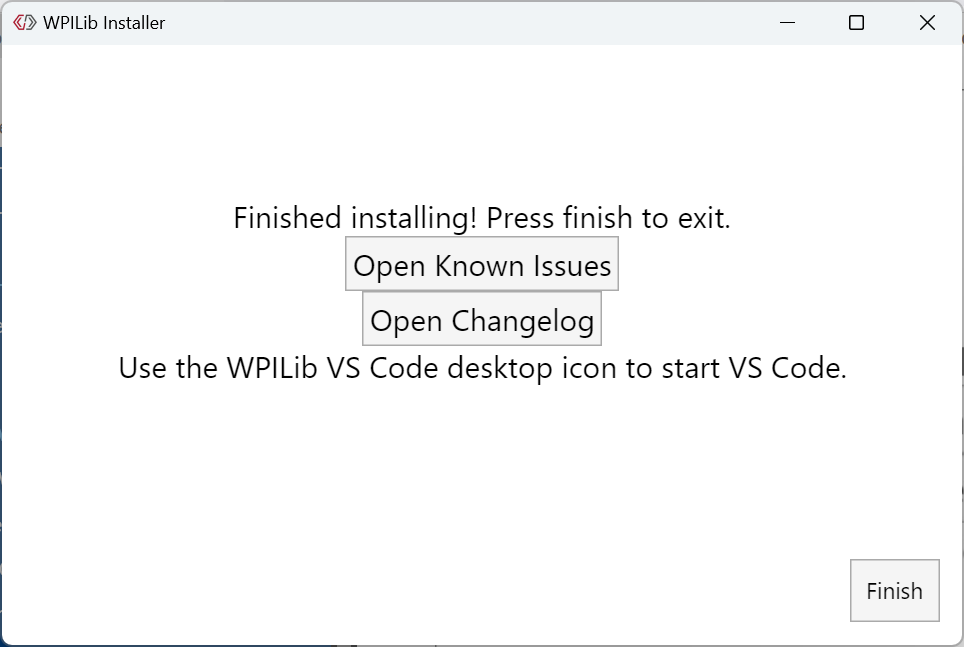
WPILib installer: Wait for the progress bar, then press Finish. Use the WPILib VS Code 2027 icon to start VS Code.4
Wait for the bar, press Finish

3Done! Open the WPILib VS Code 2027 icon. That's the one we use next session.

Press ? for keyboard help · T for contents

Contents T or Esc to close

Keyboard & mouse ? or Esc to close

→SpacePgDnEnterNext step or slide (also: click the right half of the screen, or a clicker)
←PgUpBackspaceBack (also: click the left half, or right-click)
Home EndFirst slide / last slide
12… then EnterJump to a slide number
TContents: jump to any slide (or the ☰ button, top-left)
NShow or hide speaker notes
FFullscreen on / off
?This help
EscClose notes, contents, help or a photo
On interactive slides, clicking bulbs, switches, buttons, sliders, photos and quiz answers works the piece instead of changing slides.